Acme Inc. Headquarters
This the crux of High-Low Security Accounting setup.
Journal Configuration
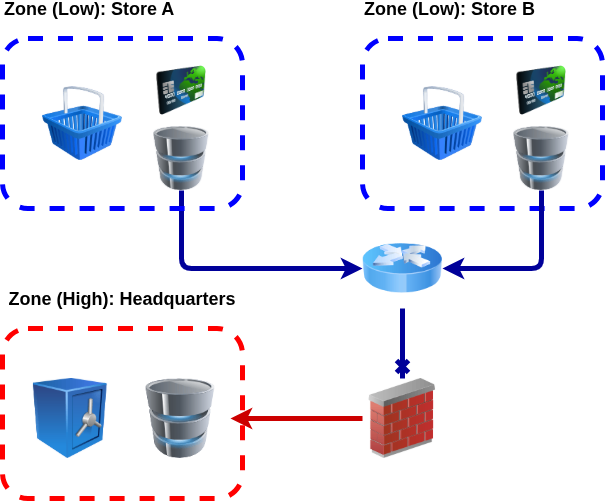
HQ’s journal is configured so that it can connect to stores' journals and they can be also automatically synchronized with HQ’s own journal.
Git Repository
git init --bare hq.git
git clone hq.git/

cd hq
git config user.name "ACME HQ"
git config user.email "hq@acme"
git config commit.gpgSign no
git commit -m init --allow-empty

mkdir conf
cp "$@" conf/

git add conf
git commit -m "HQ conf"
git push
Journal Connections for HQ and Stores
Journals between HQ and stores are connected to HQ’s main journal by git remotes. This makes it possible to synchronize transactions from stores to the HQ’s main journal.
git remote add store-a ../store-a.git
git remote add store-b ../store-b.git
Synchronizing Journals
Transaction data ("journals") are synchronized to the HQ’s main journal with git merge. Journals are separated, and they are not normal clones of each others, so the merge must be done with unrelated histories (--allow-unrelated-histories).
Tackler supports storing single transactions into single files, and it also has support for journal data sharding. Both of these features are utilized, so that there won’t be merge conflicts when these unrelated data streams are merged.
git remote update -p
git merge --allow-unrelated-histories -m "hq: merge store A" store-a/main
git merge --allow-unrelated-histories -m "hq: merge store B" store-b/main
Reporting Configuration
This is reporting configuration used by HQ setup.
|
See tackler.toml, accounts.toml, commodities.toml and tags.toml for full configuration options. |
Tackler configuration
This is pretty standard configuration for tackler. Most notable, the strict mode is turned on, so that all accounts, commodities and tags must be defined. This prevents unknown accounting data to be used by stores, and ensures that HQ has full visibility to the used Chart of Accounts.
There is no need to define store journals at HQ level, as tackler automatically discovers transactions in defined journal.
The audit mode is also activated, which means that tackler calculates checksums of used journal data. With Git Journal Backend this provides cryptographic proof of used journal data.
The journal setup is configured so that it’s possible to switch between working copy journal (plain filesystem) and Git backend with --input.storage "fs" command line argument.
[kernel]
strict = true
audit = { mode = true, hash = "SHA-256" }
ext-id = { unique = false }
timestamp = { default-time = 00:00:00, timezone = { name = "UTC" } }

[kernel.input]
storage = "git"
fs  = { path = "..",      dir = "txns", ext = "txn" }
git = { repo = "../.git", dir = "txns", ext = "txn", ref = "main" }

[transaction]
accounts    = { path = "hq-accounts.toml" }
commodities = { path = "hq-commodities.toml" }
tags        = { path = "hq-tags.toml" }

[report]
report-timezone = "UTC"
scale = { min = 2, max = 2 }
accounts = [ "Assets(:.*)?", "Warehouse(:.*)?" ]
targets = [ "balance", "register" ]

balance       = { title = "HQ: Balance Report", type = "tree" }
balance-group = { title = "HQ: Balance Group Report", type = "tree", group-by = "month" }
register      = { title = "HQ: Register Report" }

[export]
targets = [ ]
equity = { equity-account = "Equity:Balance" }
Account definitions
The Chart of Accounts for HQ contains all needed accounts, also those from Store A and Store B.
accounts = [
    "Assets:Store-A:Cashier",
    "Assets:Store-B:Cashier",
    "Warehouse:Store-A",
    "Warehouse:Store-B",
    "Equity:Balance",
]