High-Low Security Accounting
Intro
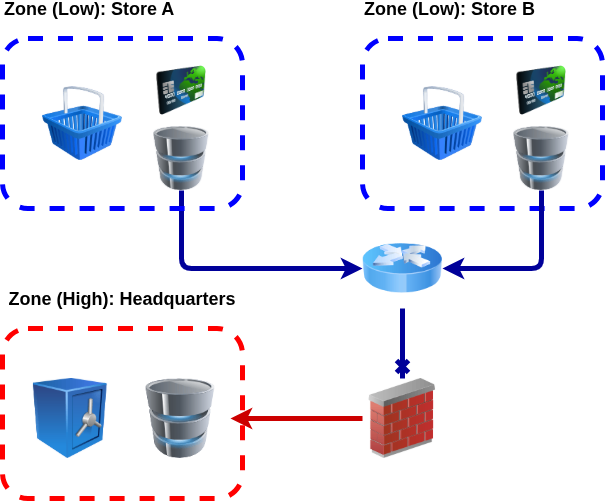
High-Low Security setups are systems where the system is partitioned into multiple different security zones. Typically, data transfer, visibility and availability is restricted between these zones. For example, data can flow from lower environments to the High Security Zone, but not vice versa.
Traditional Plaintext Accounting example would be a setup where groceries are recorded and processed with mobile phone, but whole financial data, including medical bills and investment portfolio information is processed in more secure computer setup. If the phone gets mugged and thugs manage to open it, they are only wiser about your spending habits about ice cream and candies.
This example shows how this kind of High-Low Security Accounting setup can be defined and how data synchronization could be implemented with PTA tool. The example is tackler specific, but the core concept of it can be adapted to other PTA tools.
Demonstrated Concepts
This example demonstrates many advanced concepts of tackler, and it’s also utilizing advanced features of Git Storage backend. Some of these are:
-
Many features of Git Storage based journals, including automatic data synchronization between High and Low zones, and point-in-time snapshots of journal
-
Accounting Auditing and validating used journal data
-
Filtering journal based on transaction tags
High-Low Security Example
The example tells story of major holiday sales push by Acme Inc., how accounting information flows from two stores to the headquarters, and what kind of data assurance and reporting options there are available.
|
If you would like to jump directly to the crux of this High-Low Security Accounting setup, see the configuration of Acme Inc. Headquarters. |
- First Round of Sales
-
Describes used transaction data, and adds first few sales transactions.
- First Reports at HQ
-
Shows how the journals are synchronized and inital reporting done at HQ.
- Second Round of Sales
-
Shows how journals can evolve independently over the time, and it adds more sales transactions.
- Final Reports at HQ
-
Demonstrates resynchronization of the journal, and it shows how used journal data can be verified.
- Reports for Store A
-
Shows how store specific reporting can be done at HQ level, and it also shows how specific journal version can be used for auditing and reporting.
About this Example
Actual configuration and explanations of the setup, and scripts to run this example are documented under Setup section. It also contains information how you can run it by yourself.